| Station Basel Klingelbergstrasse During the last hour: 2026-10-21 23:34:00 CEST |
|||||
|---|---|---|---|---|---|
| Variable | Now | Trend h-1 | Minimum | Maximum | Unit |
| Air temperature rooftop (38m height) | 8.9 | -0.31 | 8.6 | 13.0 | °C |
| Air temperature street level (2m height) | 8.7 | -0.77 | 8.6 | 14.4 | °C |
| Rhine temperature | 15.9 | -0.05 | 15.9 | 16.6 | °C |
| Relative humidity | 72.2 | -3.13 | 66.4 | 89.5 | % |
| Precipitation | 0.0 | *** | 5.4 ** | 0.0 | mm/h |
| Solar irradiance | 0.0 | 0.00 | 0.0 | 533.0 | W m-2 |
| Radiation balance | -9.3 | +2.31 | -42.3 | 400.2 | W m-2 |
| Wind | 1.0 | -2.35 | 2.0 ** | 8.5 | m s-1 |
| Wind direction | W ⇒ | *** | *** | *** | ° |
| Air pressure | 987.0 | +0.65 | 976.4 | 986.9 | hPa |
|
* Currently no measurements available ** Reported here is the 24-h sum for precipitation in mm, respectively the 24-h mean for the wind direction *** These measurements are not sensible information and thus are omitted |
|||||
| Today in the greater area | ||||||
|---|---|---|---|---|---|---|
| Station | Time | Measurement values | ||||
| Temperature | Air humidity | Precipitation | Wind | Wind direction | ||
| °C | % | mm/h | m s-1 | ° | ||
| Basel Klingelbergstr. | Now (2026-10-21 23:34:00 CEST) | 8.9 | 75.5 | 0.0 | 1.0 | W ⇒ |
| Basel Leonhard | 8.1 | 84.8 | 0.0 | * | SW ⇗ | |
| Basel Lange Erlen | * | * | * | * | * | |
| Basel Klingelbergstr | 17:50 UTC | 10.4 | 78.9 | 5.0 | 0.5 | SE ⇖ |
| Basel Leonhard | 9.9 | 85.6 | 4.8 | 1.5 | E ⇐ | |
| Basel Lange Erlen | * | * | * | * | * | |
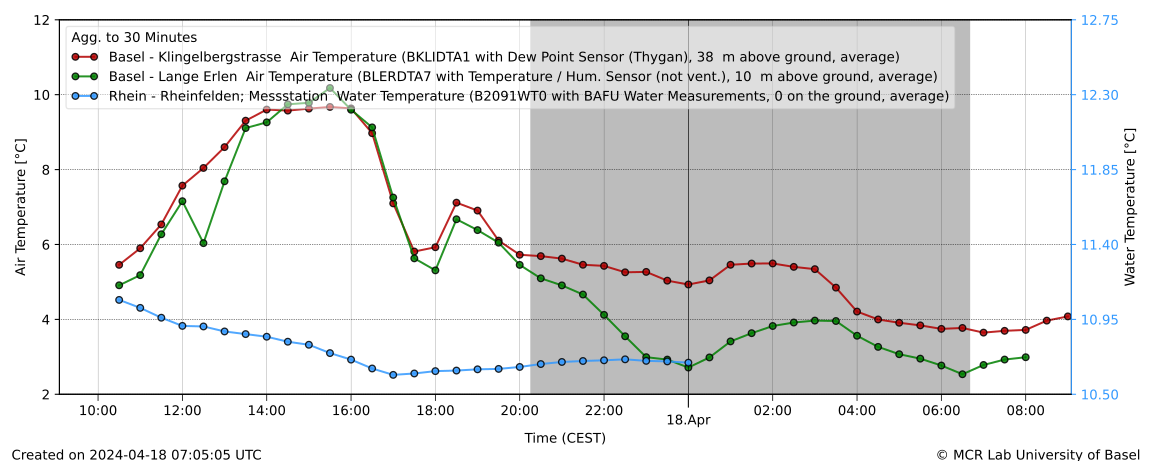
Temperature of the last 24 hours in the urban station Basel-Klingelbergstrasse and the rural station Basel-Lange Erlen. Click to open in new tab to allow zoom.
| The weather during the last seven days in the area of Basel | |||||||
|---|---|---|---|---|---|---|---|
| Station | Measurement values | ||||||
| Temperature | Precipitation | Hours of sunshine | Wind | Gusts | |||
| Mean | Minimum | Maximum | |||||
| °C | mm | h | m s-1 | m s-1 | |||
| Basel Klingelbergstr | 12.3 | 7.9 | 21.7 | 29.3 | 30 | 2.0 | 9.9 |
| Basel Leonhard | 12.0 | -26.3 | 22.3 | 29.4 | 28 | 2.0 | 11.1 |
| Basel Lange Erlen | * | * | * | * | * | * | * |
| The weather during October 2026 in the surroundings of Basel | |||||
|---|---|---|---|---|---|
| Station | Measurement values | ||||
| Mean temp. | Precipitation | Hours of sunshine | |||
| ° | mm | h | |||
| Basel Klingelbergstr. | 19.6 | 16.7 | 292 | ||
| Basel Leonhard | 19.4 | 12.8 | 291 | ||
| Basel Lange Erlen | 18.9 | 13.7 | 281 | ||
| Mean climate: Basel Lange Erlen | 15.5 | 58.5 | 152 | ||
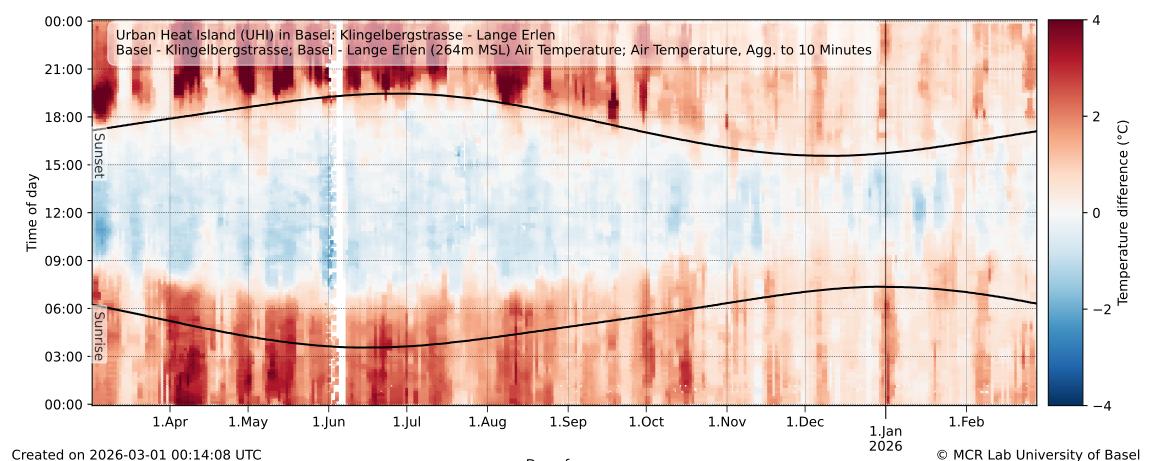
Diurnal versus annual temperature difference from Basel Klingelbergstrasse (urban surroundings) to Basel Lange Erlen (rural surroundings). Click to save, drag to new/other tab to enable zooming capabilities.
Further graphs related to the ICOS network may be found under the section Basel energy fluxes, or specifically for the ICOS associated station BaK (Basel Klingelbergstrasse) including more footprints for BaK and other EC stations in and around Basel. The final fluxes may be retrieved via the ICOS data portal, specifically BaK.
Made with ❤ in Switzerland by spirrobe
News
Click to expand and read
May 2026: Introduction of profile page on datashop
This month we officially released the profile page on the datashop. This allows users to create and manage their email, easily get the API key that they need for access and last but not least to redo their last couple of orders.
Apr 2026: Introduction of API
Officially released this month is the DUW ATM API which allows access to the timeseries data available on the datashop. Use of the API requires registration via the datashop and adherence to usage guidelines. Furthermore, this means that machine-access for small clients or regular use in script is now possible without the user interaction required by the datashop.
Feb 2026: Introduction of flagging table to database
As of this month we have introduced the flagging entries (manual quality checks) to our database. This does not sound astounding but this means that now both datashop can retrieve the flags to apply quality checking.
Since these are usually manual (automatic checks happen before writing to the database) there is some delay but they provide a better end user experience and trust in our data
Plus they are quite useful for us too and our internal checks and dashboards. So far we have flagged almost 160k periods (over all timeseries, the flagged time period varies of course with the reason for the flagging and often more than one timeseries is flagged per stations). The maximum number of entries is almost 500 for one timeseries.
Dec 2025: Transfer to new database server
IT infrastructure changes everywhere, also at the University of Basel and the atmospheric sciences. Namely, we moved our database to a new server and data storage. Combined with this, we merged our meta information and slightly restructured our tables
For the time being, both old and new servers will operate side by side but this page (dolueg2) uses the new server. In the background our data pipelines needed to be adjusted but for the users, no changes should be evident. The next step is to allow better quality flagging - stay tuned...!
Jul 2025: Reinstrumentation and design of EC system
As of this July, the EC system at the tower top in BKLI has been redesigned and modernised to replace the more than 20 year old Gill HS and a at the time very progressive sampling solution with labview.
With changing IT needs and instrumentation, this has been modified to run similar to other stations directly on the logger. This facilitates the whole data pipeline. We hope for great measurements!
Sep 2017: FogNet goes Movie
In the background of the Namib Fog Life Cycle Analysis project the need to see fog events together with station data from FogNet becamse apparent.
We thus tailored a GDAL pipeline using existing MSG data to create band composites, add stations and their data (wind and fog precipitation) to them and animate them. This has led to many videos that are crucial for interpretation of fog events and their often quite unique dynamics.
Jul 2016: Integration of projects pages into dolueg2
Fitting the overarching idea to consolidate the website of the MCR all the old project pages have been integrated. This allows interested visitors to learn easily more about the research by the MCR
This integration would also allow us to finetune future projects for display and information, an advantage that we could reap for NaFoLiCA
Jul 2015: New dolueg2 superseeding old dolueg
The old dolueg faced several issues, most severly the issue of plot management and adjustment. The design just relied too much on hardcoded plots and thus was also limited for the MCR. Additionally, the backend for plot production reliad on IDL, namely the PNG pipeline which has resolution issues in the version 7.5.X. A first development was to instead create EPS/PS plots which are vector type graphics and thus far more suitable for many timeseries related displays. At the time and with the given version however, we needed to use latex to convert the PS figures to SVG that is more suitable for webdisplay.
To match the new faciliate making of graphics the frontend of dolueg needed an urgent facelift, more modern redesign and core functionality to reduce manual work and hardcoding in the back. This was implemented with a dynamic search function and attritbution to station/variables. Another 10 years later, the workflow has remained the same despite many changes in stations, databases and new programming languages
About this page
Dolueg2 is the successor to dolueg and mainly meets our own needs at the MCR Lab, i.e. the control of our different stations and of the associated data flow. In addition, the graphs allow us to achieve a quick quality control
Navigation
Dolueg2 is structured on the main level by (more or less) geographical distinct campaigns. Under each campaign you will find the single stations associated with the campaign and the time series we have selected. If you click on the campaign in the top menu, you will get a selection of overview graphics, often including maps of the stations under information. For this overview and the single stations the figures may be shown for a specific station of for specific variable (e.g. temperature and humidity). For each station a map showing the wind field and location is included again under information. Such wind fields and corresponding maps are separated into wind during night and day as indicated by the colors. Further, the newest wind vector at the time of creation is indicated with an orange arrow. If no wind is measured, just the location may be indicated
Dolueg2
Contrary to the previous version, figures are created as SVGs (scalable vector graphics). As the name indicates, these are vectors graphs instead of typical raster images and are thus scalable. To keep the layout somewhat consistent, for the zoom/scale functionality you will have to drag the figures to a new/other browser tab. If you are interest in a specific figure, simply right-click on it and a "Save as ..." dialog should open. If you need another format than SVG (looking at you Microsoft users), you may convert them with other programs such as Corel Draw, Adobe Illustrator or Inkscape.
Special campaigns
Within "Tower-Cam" you can additionally find a timelapse video of our tower-mounted camera on the roof of the Klingelbergstrasse 27. The menu entry "Control" is to allow another quick internal view of the data flow and whether errors may have occurred.
Hint for external users
Since the MCR Lab is mainly concerned with research, we do not guarantee or assume any liability for the quality or even actuality of any figures.
Further information on the dolueg page
If you have comments, questions or data requests, kindly send an email to our shared mailbox.
As of July 2020 you can find the code to create a similar homepage on Github as "dolueg2page" as well as the code for our figures as "dolueg2figures". Both may need adjustments to your particular solution however. For documentation and guides see the respective repository.